The proof: an eval suite and a touchless-rate dashboard you keep.
Every AP automation vendor has a demo. What almost none of them have is a way to show you, on your own invoices, that the numbers hold up. This page is that mechanism: the golden dataset, the four checks that run against it, the thresholds fixed in the contract before cutover, and the dashboard that keeps measuring after you go live.
A polished demo tells you nothing about your invoices
Demos run on curated invoices: clean scans, well-known formats, vendors chosen because they behave. Your invoice stream is not curated. It is the vendor who redesigned their template last quarter, the purchase order created after the invoice arrived, the near-duplicate resend from a vendor's flaky billing system.
Seventy-seven percent of finance teams are still keying invoices by hand, according to IFOL's 2026 AP Automation Trends report with SAP Concur, and a meaningful share of that is not because nobody has tried automation, it is because the automation they tried was proven on somebody else's data, not theirs. A touchless rate advertised in a sales deck was measured on the vendor's own customer base, under their own definition of a match, and it tells you very little about what will happen on your invoices, at your volume, with your vendor mix.
So this page is not a pitch for a number. It is a description of exactly how the number gets checked, twice: once before you commit, with a golden dataset built from your own invoice history and an eval suite that has to clear thresholds written into the contract, and again continuously after you go live, on a dashboard you keep. If you want the stage-by-stage mechanics of the pipeline itself, capture, match, coding, and the exception gate, that is covered on How it works. This page is about how we know it actually works, and how you keep knowing after I am gone.
The golden dataset: your invoices, labeled by hand
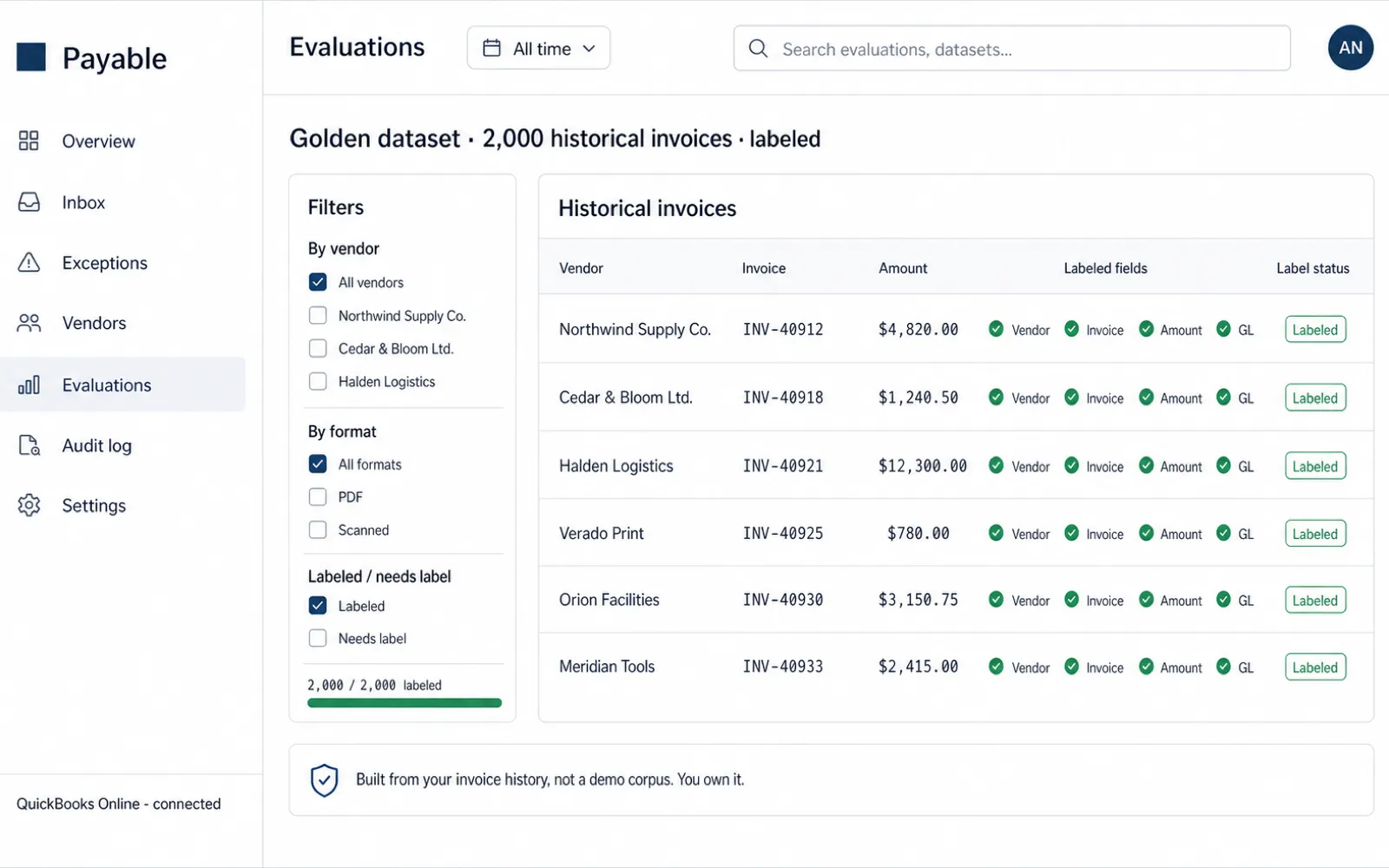
During discovery week, we pull a sample of your actual invoice history, not a demo set and not a synthetic one. Typically a few hundred invoices spanning your highest-volume vendors, your messiest formats, and a deliberate sample of the edge cases that break naive automation: multi-page invoices, credit memos, invoices with no PO attached, near-duplicate resends, and foreign-currency invoices if your business has them.
Every invoice in that sample gets labeled by hand: every header field, every line item, the correct GL code, and the correct match verdict against the PO and receipt it should tie to. That labeled set becomes the golden dataset, the ground truth that every version of the extraction and matching logic gets tested against, during the build and for as long as you keep using the system afterward.
Because it is built from your invoices, it would be worthless to reuse for anyone else's build. That is the point. It tests what your system will actually see in production, not a generic benchmark that happens to look good in a sales deck.
Extraction accuracy, field by field
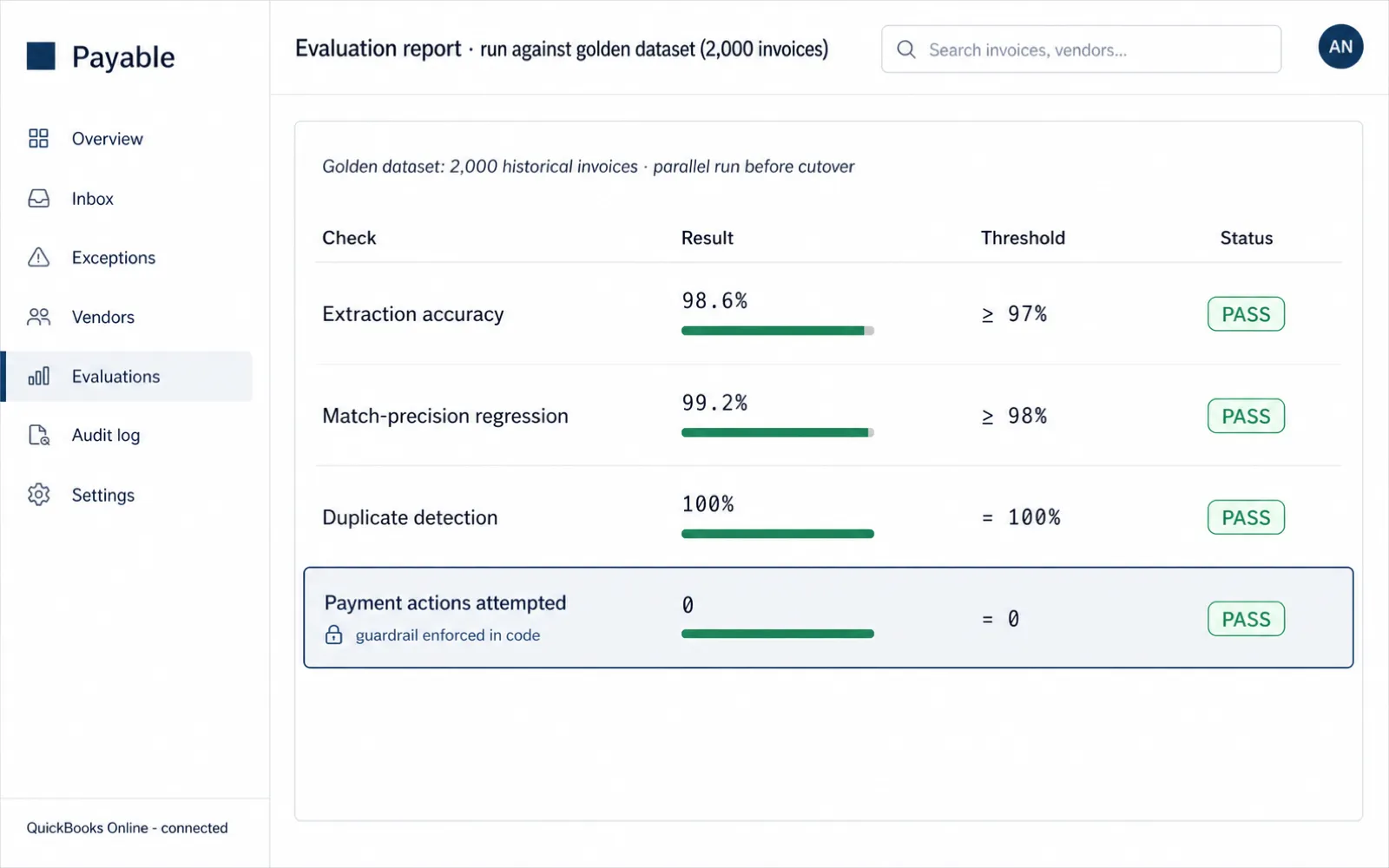
The first check in the eval suite measures extraction against the golden dataset, field by field. Not "did it get the invoice roughly right," but did it get the vendor name right, the invoice number, the date, the PO reference, the subtotal, the tax, the total, and every line item, each one scored on its own.
Field-level scoring matters because a single transposed digit in a total is a different kind of failure than a slightly reformatted vendor name, and averaging them into one accuracy number hides the failure that actually costs money. We track precision and recall per field type, and we track it separately by vendor format, because a system that scores 99% on your cleanest vendor and 80% on your messiest one is not "95% accurate." It is two different systems wearing one average.
Match-precision regression: hunting confident-but-wrong matches
The second check is the one that matters most, and the one most automation vendors skip. It is straightforward to build a 3-way match that looks accurate in a demo. It is much harder to build one that never confidently approves a match that is actually wrong: a quantity off by a decimal, a price variance sitting just inside a badly-set tolerance, an invoice matched to the wrong PO because two vendors have similar names.
We call these confident-but-wrong matches, and they are the real risk in automated matching. A low-confidence match gets routed to a human by design, so it is caught. A high-confidence wrong match sails straight through, which is exactly why the regression suite exists: it runs known-bad pairs, near-miss pairs, and adversarial cases (deliberately similar vendor names, off-by-one quantities, stale price lists) through the matcher and checks that every one of them gets held, not waved through with high confidence.
This suite runs on every change to the matching logic, not once at launch and then forgotten. A tolerance adjustment that fixes one vendor's false exceptions cannot be allowed to quietly weaken the exception logic for every other vendor, and the regression suite is what catches that trade-off before it ships.
Duplicate detection: catching resends without crying wolf
The third check is duplicate detection: the same invoice submitted twice, a legitimate credit memo that superficially resembles a duplicate, a resend after a vendor's billing system hiccups. Duplicate payment is one of the most common and most preventable losses in accounts payable, and it is also one of the easiest to catch with the right combination of signals, vendor, invoice number, amount, and date, checked consistently across a rolling window rather than assumed away by a spot check.
The eval suite includes known duplicate pairs and known near-duplicates that are not actually duplicates, because two invoices from the same vendor for the same amount in the same month are not automatically a repeat. We measure both the catch rate and the false-positive rate. A system that flags everything as a duplicate is exactly as useless to your AP team as one that misses them, it just moves the cost from fraud risk to review fatigue.
Payment actions attempted: zero, by design
The fourth check is not a probability, it is a hard assertion. Every build ships with an automated test that scans the agent's complete action log for any attempt, successful or not, to initiate a payment, move funds, or write to a payment rail. That count has to be zero on every single test run, and it is verified before every deployment, not just once at handover.
This is not a policy the agent is asked to follow. It is a boundary enforced in code: the agent's available tools do not include a payment action, so there is nothing to attempt in the first place. The check is really a confirmation that the boundary held, not a hope that it will keep holding. Payment stays in your existing approval chain, exactly where your controls and your auditors already live.
The eval suite runs as a set, before every cutover and every material change
The four checks above are not run once and forgotten. They run as a single suite against the golden dataset before the initial cutover, and again any time the extraction or matching logic changes materially, so a fix in one area cannot quietly regress another.
Acceptance thresholds, written into the contract, not promised on a call
None of the four checks above means anything if the bar for passing is vague. During discovery, before writing meaningful production code, we agree in writing on the specific thresholds each check has to clear ahead of cutover: extraction accuracy per field type, the match-precision regression pass rate, the duplicate catch rate at an acceptable false-positive rate, and the payment-actions-attempted count at zero, which is non-negotiable regardless of anything else. Those numbers go into the statement of work. They do not live in a slide that gets forgotten after the sale.
If the eval suite does not clear the agreed thresholds by the point cutover was supposed to happen, cutover does not happen. We keep working the extraction and matching logic against the golden dataset until it clears, or we have an honest conversation about what in your invoice process needs to change first, usually a purchase-order discipline gap that the exception queue will already have surfaced on its own.
The parallel run: your real touchless rate, before you commit to cutover
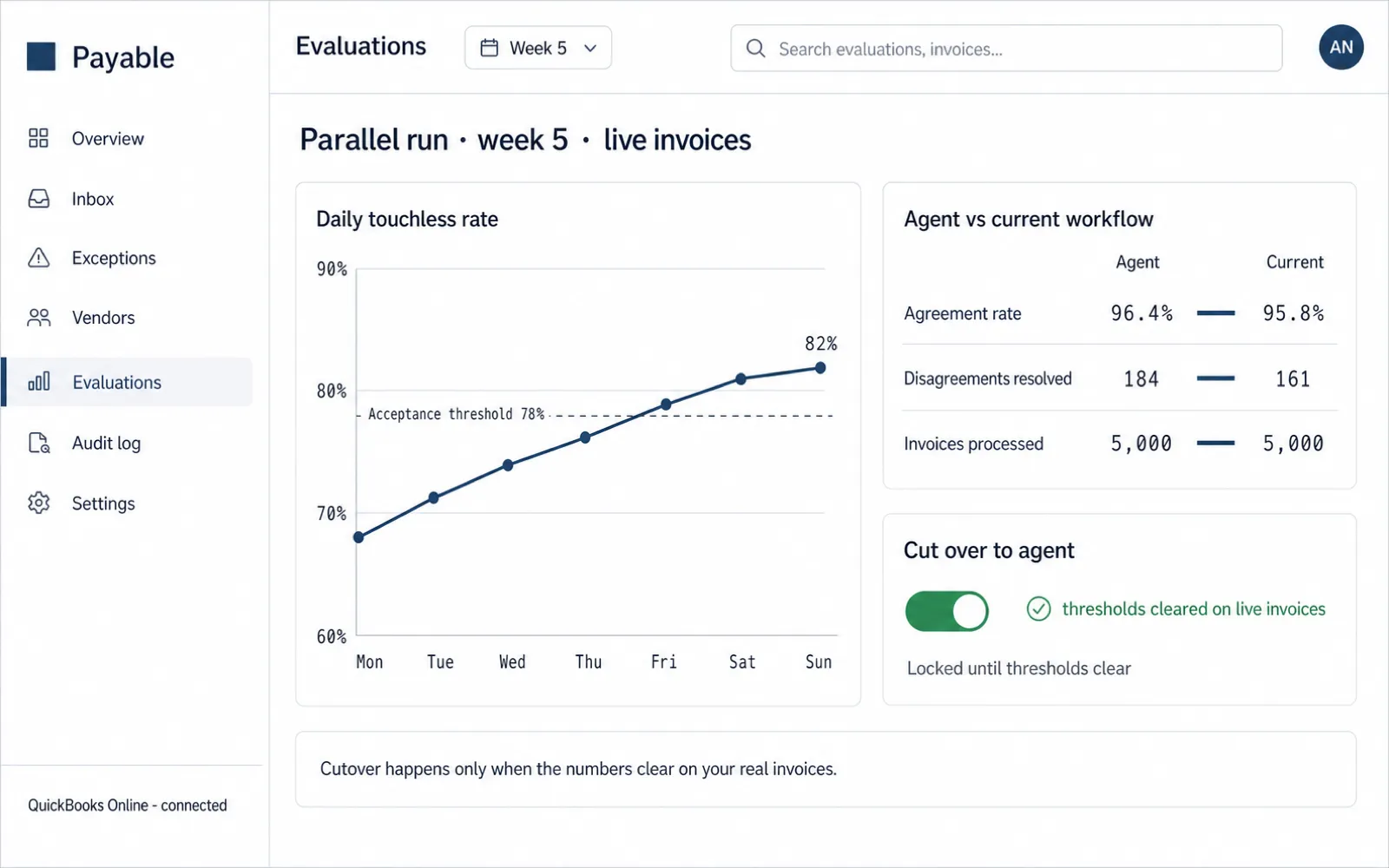
The golden dataset and the eval suite prove the logic works against history. The parallel run proves it works against invoices arriving today. In week five, the agent processes your live invoice stream alongside your team, in parallel, not instead of them. Every invoice it captures, matches, codes, and either clears or routes to the exception queue gets compared against what your team actually did with the same invoice.
That comparison produces the number that matters most: your real touchless rate, measured on your live, unfiltered invoice stream, not a curated sample and not a vendor's benchmark measured on somebody else's invoices. It also produces something almost as useful, a breakdown of exactly which invoice types and which vendors are driving whatever that number turns out to be, which is usually the fastest way to see where your own upstream process has a gap worth fixing before you ever touch the model.
Cutover happens only after the parallel run clears the thresholds fixed in the contract. Until then, your team keeps doing exactly what they do today, and nothing changes for your vendors, your books, or your close.
A touchless-rate dashboard, not a one-time report
The parallel run is not a one-time event that produces a number and disappears. The same measurement keeps running after cutover, surfaced on a dashboard that ships with the build and stays yours: touchless rate over time, exception volume by reason, per-vendor and per-format performance, and drift, whether extraction accuracy is slipping on a vendor who just redesigned their invoice template.
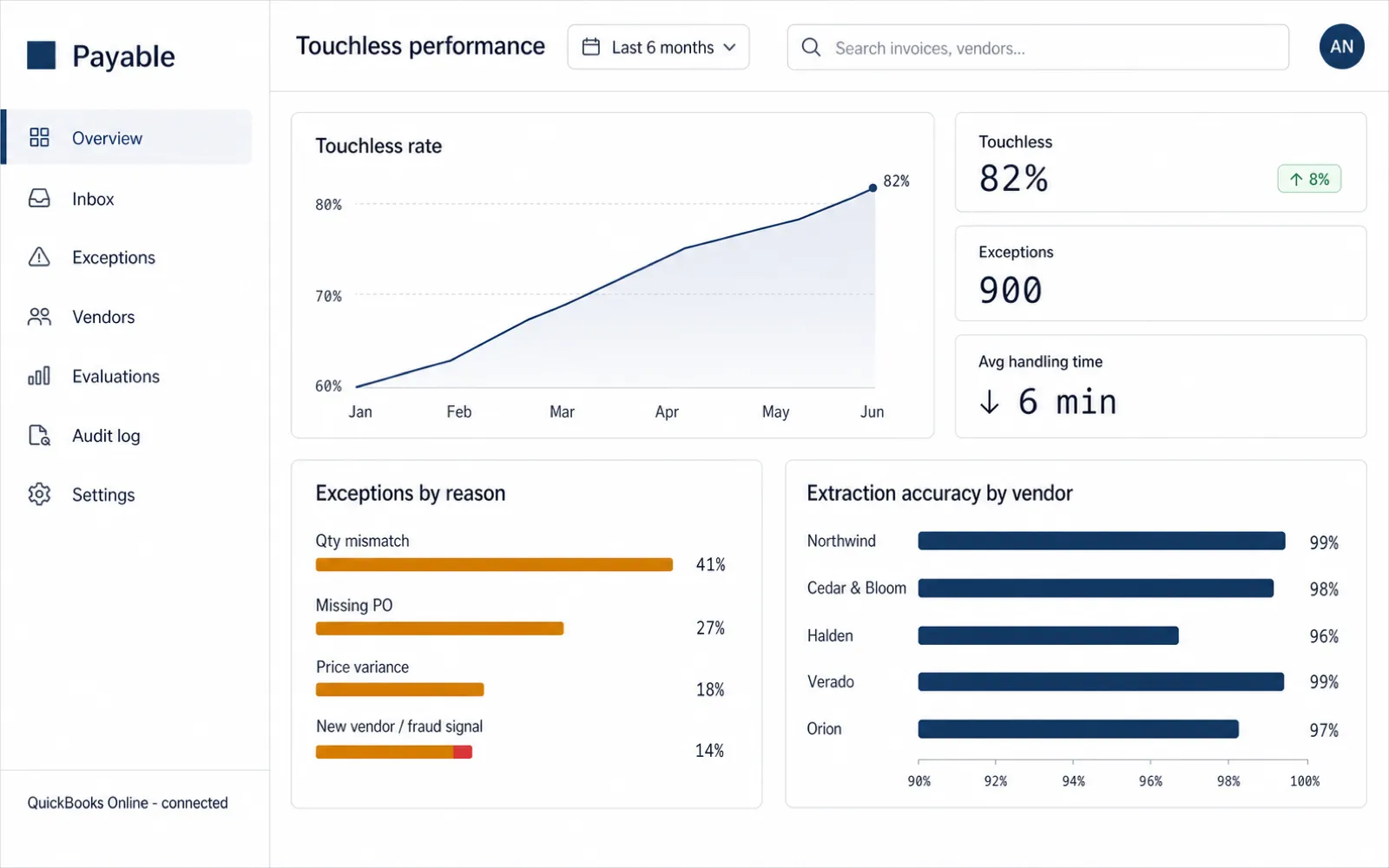
The dashboard exists so the touchless rate is never a number you have to take on faith, or dig for in application logs after the fact. It is the same number your AP team, your controller, and, if it ever comes up, your auditor can look at, calculated the same way every time, from your own processing history. If your invoice mix shifts, a new vendor, a new format, a busy season, the dashboard shows you that shift as it happens rather than three months later in a spreadsheet reconciliation.
What you actually own when this ships
At handover, you are not licensing a runtime you can lose access to. Everything below is yours, in your own repository and your own infrastructure.
- Full source code for the capture, match, coding, and routing pipeline
- The accounting-system integration and the exception queue
- The touchless-rate dashboard
- A runbook for running and operating all of it
- The eval harness: the test runner and all four checks described above
- The golden dataset, yours to extend as your invoice mix changes
- The match-precision regression suite
- Documentation on how to re-label new edge cases into the golden dataset
If you never speak to me again after the 30-day stabilization window, everything above still runs, and you can verify that yourself by re-running the eval suite against the golden dataset whenever you like.
The touchless rate depends on you, not just on the build
It would be easy to close this page with a number. I am not going to, because any figure quoted before seeing your data is a guess dressed up as a promise, and IFOL research puts 63% of AP teams at ten or more hours a week on invoice processing in part because the platforms that promised a number never measured it the same way twice.
Your real touchless rate is a function of things that are yours to control, not mine to engineer around. Your PO discipline, whether purchase orders are created before the invoice arrives, consistently, across departments, is the single biggest lever. Your vendor mix matters just as much: a handful of high-volume vendors who never redesign their invoice format will clear close to full touchless processing, while a long tail of one-off vendors will not, and no amount of model tuning changes that arithmetic. Your tolerance settings are a real trade-off too, looser tolerances lift the touchless rate and loosen what "matched" is allowed to mean, which is a decision your team makes deliberately, not a free win the system hands you.
The parallel run measures the number your actual data produces. The dashboard keeps measuring it after. Nothing on this page is a promise; it is a description of exactly how the number gets checked, and checked again, so that when you do see a number, you know where it came from and you can defend it to your own controller. If your invoice volume and per-invoice cost make the case worth running on paper first, the math for that is on Pricing & ROI.
The proof is measured. The boundary that keeps it safe is enforced in code.
Every threshold on this page is about whether the system's decisions are correct. The next question is what it can and cannot do with your money, and that answer is not a policy on a page, it is a hard boundary built into the system itself.