Integrations: fits the stack you already run.
This is not a platform asking you to migrate your accounting system, retrain your team, or change how invoices arrive. It reads the documents you already receive and writes coded invoices into the approval workflow you already use. Here is exactly what it connects to, and what it does not.
No rip-and-replace, no new system to learn
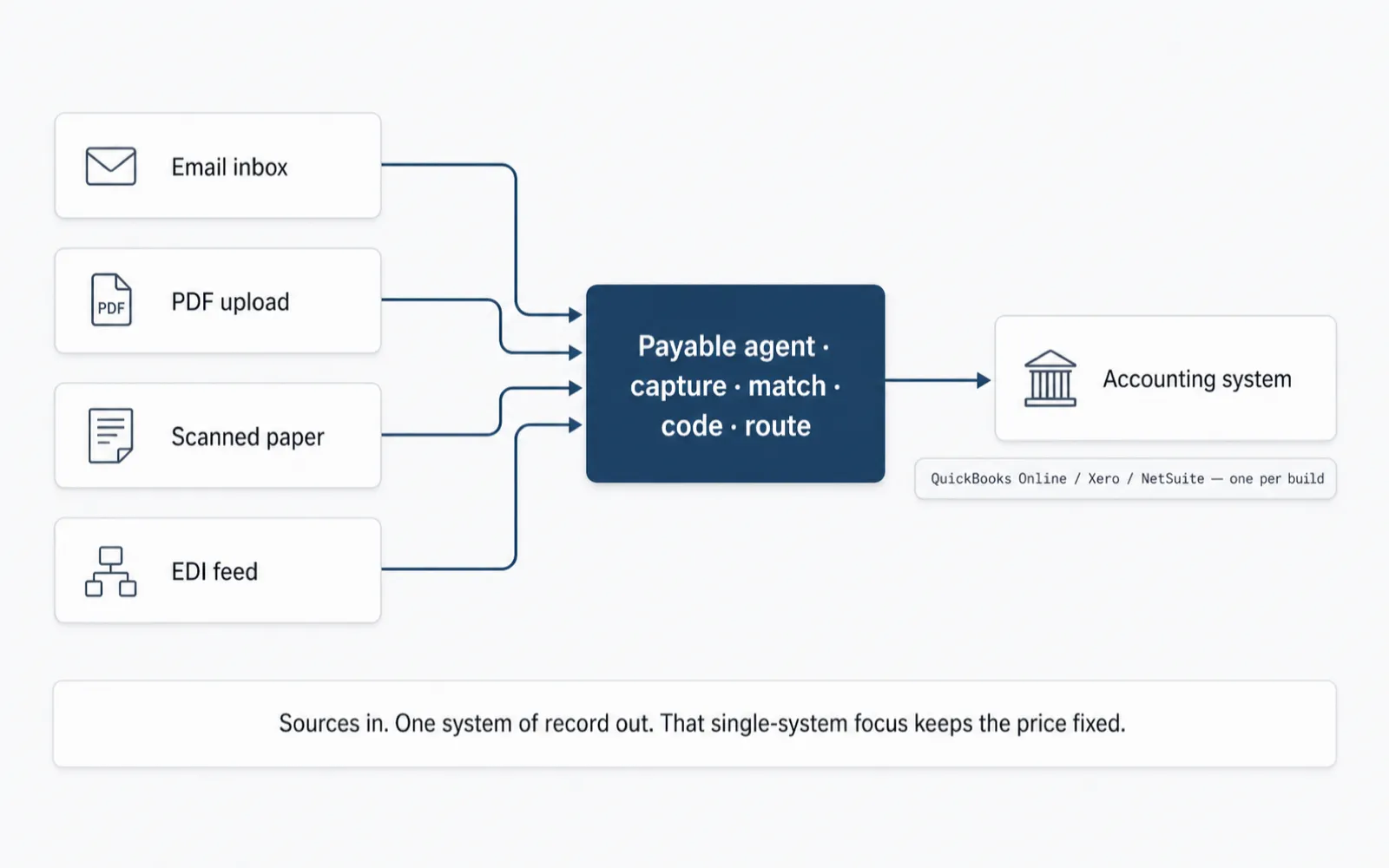
The agent sits between your existing inputs and your existing accounting system. Nobody on your team logs into a new piece of software to do their job differently; the invoices they already approve just arrive pre-captured, matched, and coded.
Most AP platforms ask for the opposite trade. They want you inside their inbox, their approval screen, their vendor portal, because that is how a per-invoice or per-seat vendor locks in the relationship. This build does not work that way. Your accounting system stays the system of record, your approval chain stays the approval chain, and your team's daily tool stays whatever they already open every morning. The agent is the layer that removes the re-keying in between, not a destination that replaces what you have.
That matters for two practical reasons. First, there is no re-training project: nobody has to learn a new UI to approve an invoice, because approval still happens where it always happened. Second, there is no migration risk: your historical data, your chart of accounts, your vendor master, all of it stays exactly where it is. The build reads and writes against your systems; it does not ask you to move them.
There is a quieter cost this avoids too. Standing up a new AP platform usually means an IT ticket for SSO, a round of user provisioning, a security review of a new vendor with access to financial data, and a rollout plan for people who are already busy. None of that happens here, because there is no new destination system for your team to log into and no new vendor holding a copy of your invoice data in their own multi-tenant database. The agent's own infrastructure lives in accounts you control, covered in more detail on the Security & controls page, and the only new login anyone needs is the one the build's read/write access uses behind the scenes.
The sources it reads
Invoices do not arrive in one clean format, and the capture stage is built around that reality rather than around an idealized one. It watches the channels invoices actually come through and normalizes whatever it finds into the same structured record before anything downstream ever sees it.
An email inbox is the most common source for mid-market AP: a shared mailbox that vendors already send PDFs to, monitored the way it always has been, except every attachment now gets read instead of forwarded by hand. A PDF or scan dropped into a folder, whether that is a vendor portal export or a paper invoice someone scanned at reception, is handled the same way. An EDI feed, where a larger vendor sends structured invoice data directly, is parsed rather than re-typed, which is usually the highest-confidence source of the three because the fields already arrive labeled.
Two more inputs make the match possible rather than just the capture: purchase orders, whichever system issues them, and your vendor master, the list of approved vendors and their banking details that the match stage checks every invoice against for the fraud signals covered on the Security & controls page.
On format specifically, since "handles any invoice" is a claim vendors make loosely: native, text-based PDFs are the easiest case and extract at the highest confidence. Scanned or photographed paper is handled through the same pipeline but starts from a lower-confidence baseline, since image quality, skew, and handwriting all degrade OCR before extraction even begins, and the agent is built to flag rather than force a guess in that situation. Structured feeds, an EDI 810 or a CSV export from a PO system, skip most of the extraction risk entirely because the fields already arrive labeled; those tend to have the highest straight-through rate of any source. None of this is invented for the page, it is the ordinary shape of document quality any IDP system deals with, and it is exactly why every extracted field carries a confidence score instead of a flat "success."
One system of record: QuickBooks Online, Xero, or NetSuite
Every build writes back to exactly one of QuickBooks Online, Xero, or NetSuite, chosen at the start of the engagement to match whichever one your finance team already runs. That single-system constraint is not a limitation dressed up as a feature; it is the specific decision that keeps the price fixed and the five-week timeline honest. Each accounting system has its own API shape, its own approval-workflow model, its own way of representing a bill and its line items. Supporting all three inside one engagement would mean building and maintaining three integrations for the price of one, and either the price would rise or the corners would get cut on the one you actually use. Building against one system, deeply, is what lets the coding and routing stage in the pipeline hand off a bill that looks and behaves exactly like one your team keyed in by hand.
Plainly labeled, so there is no ambiguity about what "integration" means here: this build talks to QuickBooks Online via its REST API and OAuth, to Xero via its accounting API and OAuth 2.0, or to NetSuite via SuiteTalk/REST and a role-scoped integration record, whichever one is yours. There is no proprietary connector, no unnamed "accounting software," and no partnership claim beyond the plain fact that these are the three the build supports today, one per engagement.
The three are not interchangeable under the hood, and the honest answer is that the build accounts for the differences rather than papering over them. QuickBooks Online and Xero are generally the simpler targets: single-entity by default, with approval workflows that are straightforward to slot a coded bill into. NetSuite is a heavier system by design, built for multi-subsidiary organizations, and its role-based, workflow-driven approval model (SuiteFlow) usually takes longer to map correctly during discovery, which is one reason the discovery week exists before any code gets written. None of that changes what you pay; it changes how the four build weeks are spent under the surface.
What lands in your accounting system, and what does not
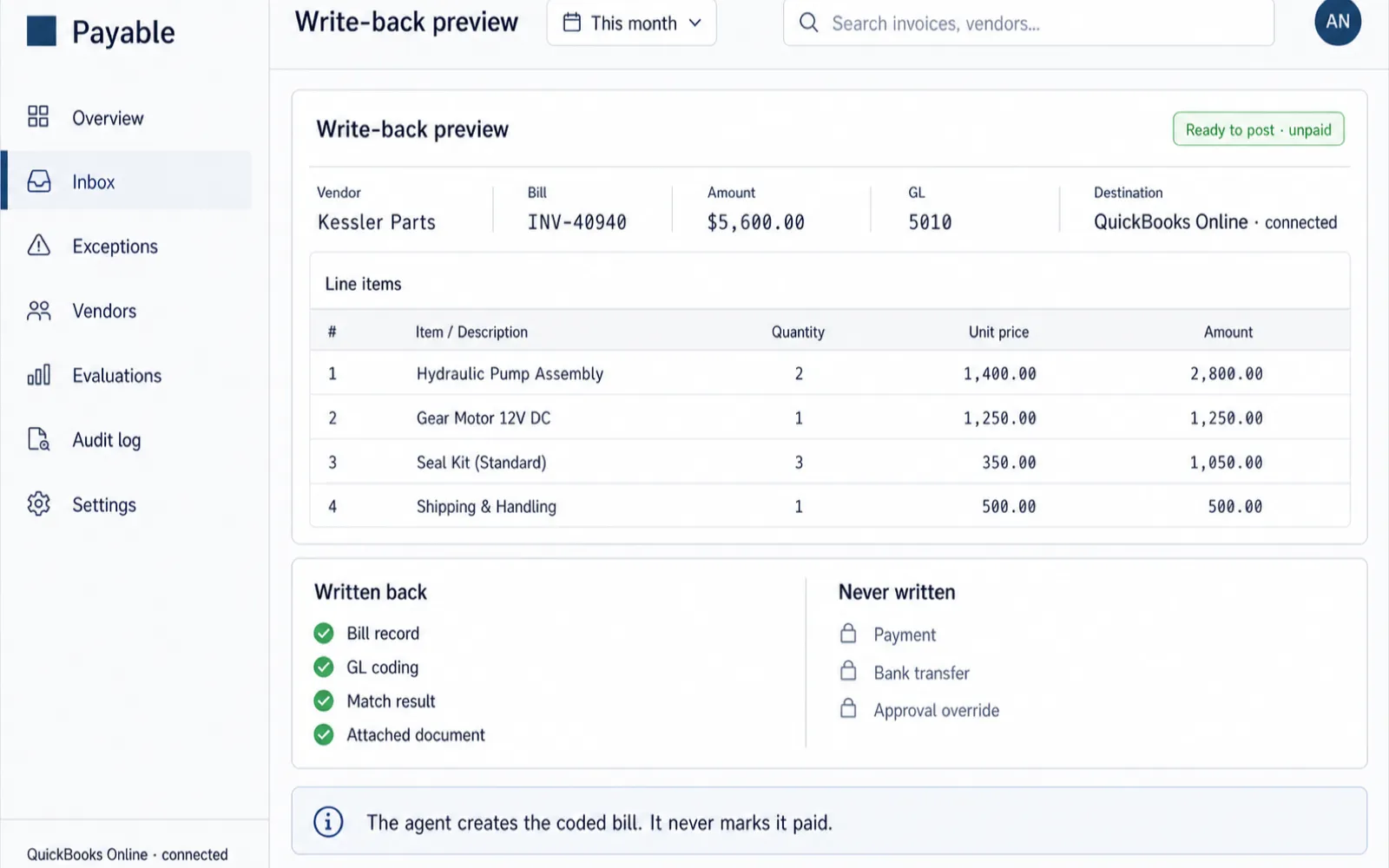
A coded bill or invoice record, matched to its PO and receipt where one exists, with GL codes proposed from your chart of accounts and your own coding history, entered into your existing approval workflow at the step where a human approver would normally see it. The approver sees the same object they always approved, already coded, with the source document and the match result attached for reference. If your workflow already has multiple approval steps, say a manager sign-off followed by a controller sign-off above a dollar threshold, the coded bill enters at the first step exactly as a manually keyed bill would, and moves through the same chain from there.
It never initiates, schedules, or executes a payment, and it never approves its own coding. Both of those actions stay inside your accounting system's native approval and payment features, where your controls and your auditors already operate. That boundary is enforced in code, not left to configuration, and is covered in full on the Security & controls page. It also does not overwrite anything already in your accounting system; it only creates new coded records for new invoices, so there is no risk of it touching historical bills, closed periods, or reconciled data while it runs.
A second system or multi-entity is a follow-on, at a public price
Some finance teams run more than one legal entity, more than one accounting instance, or are mid-migration from one system to another. All of that is real and the honest answer is that the base $14,000 build covers one accounting system, one primary entity's chart of accounts and approval chain. A second entity on the same accounting system is a smaller, scoped follow-on, mostly configuration and a second set of coding rules rather than new pipeline work. A second, different accounting system (say NetSuite in addition to the QuickBooks build already shipped) is closer to a second build, because it means a second integration, though the capture, match, and exception-queue logic already exists and does not need to be rebuilt from nothing.
Either way, the price for that follow-on work is quoted the same way the base build is: in writing, in advance, in public on the call, never buried in a "contact sales" form. There is no bait-and-switch where the flat price turns out to only cover a stripped-down version of what you actually need.
Mid-migration is its own case worth naming directly: if you are moving from, say, an on-premise system to NetSuite, or from QuickBooks Desktop to QuickBooks Online, the honest recommendation on the discovery call is usually to wait until the destination system is stable before wiring the agent to it. Building against a moving target adds risk to both projects at once, and the golden dataset built from your invoice history is more reliable once your coding patterns have settled in the new system rather than half-formed during a transition.
One build pattern, expansion per client
If you run AP for multiple clients, the integration question changes shape: it is not "does this connect to my accounting system," it is "does this connect to each client's."
Because each build targets one accounting system per engagement, a firm running clients across a mix of QuickBooks Online, Xero, and NetSuite deploys one build pattern per client rather than forcing every client onto the same platform. The capture logic, the exception-queue design, and the eval methodology carry over from the first engagement; what changes per client is the specific integration, the client's own chart of accounts, and the client's own vendor master and coding history. That reuse is what makes the economics work for a firm: the second and third client engagements are faster and cheaper to stand up than the first, at a public per-engagement price instead of a platform charging a per-entity licensing fee on top of your own client fees.
Data stays isolated per client and per tenant regardless of how many engagements a firm runs; one client's invoice history, vendor master, and coding rules are never visible to another client's build. That isolation model is described in more depth on the Security & controls page, and the economics of a multi-client rollout are worth walking through on the discovery call directly, since the right structure depends on how many clients, how many systems, and how much overlap there is in vendor bases.
In practice, a firm's first client engagement takes the full discovery-to-stabilization timeline described on the how it works page, since that is where the reusable pattern gets built. Each additional client still gets its own golden dataset, its own eval thresholds, and its own parallel run, because a touchless rate proven on one client's invoices says nothing about another client's PO discipline or vendor mix, but the underlying capture and match engine does not need to be re-architected each time.
What you provide during discovery
The five-week timeline on the how it works page assumes access and data are available in week one, so the fastest builds are the ones where a controller or AP lead can hand these over promptly rather than chasing them down mid-engagement.
The historical coding data matters more than it might look on this list. Six to twelve months of past invoices, coded the way your team actually codes them, not the way a policy document says they should be, is what the golden dataset and the eval suite are built from, and it is what lets the GL-coding stage propose codes that match your patterns instead of a generic chart-of-accounts guess. Thinner history is not disqualifying, but it does mean the coding proposals start from a smaller base and improve more gradually as the agent processes live invoices during the parallel run described on The proof page.
One flat price covers the integration you actually need.
$14,000, once, includes the accounting-system integration, the exception queue, and the eval harness that proves it works on your invoices before you cut over. See exactly what is and is not in that number.